> ## Documentation Index
> Fetch the complete documentation index at: https://docs.pragma.build/llms.txt
> Use this file to discover all available pages before exploring further.
# Merkle Feeds
> Merkle feeds are the most efficient way to get complex financial instruments updated on-demand on Starknet.
# Merkle Feeds
Merkle feeds provide a secure and efficient "pull oracle" model for accessing option prices and other financial data on Starknet.
The Pragma Consumer SDK is a powerful tool that allows developers to interact with Pragma's Merkle Feed system.
This SDK enables you to fetch option prices and their associated Merkle proofs, which you can then use with the Pragma Oracle contract to access on-chain data.
## What is a Merkle Feed?
A Merkle Feed is an efficient way to publish and verify large amounts of data on-chain while minimizing gas costs.
In Pragma's case, we publish a Merkle root on-chain that represents a tree of option prices for a specific blockchain height. Users can then use our SDK to retrieve prices off-chain and verify their correctness on-chain, creating a secure and efficient "pull oracle" model.
## How It Works
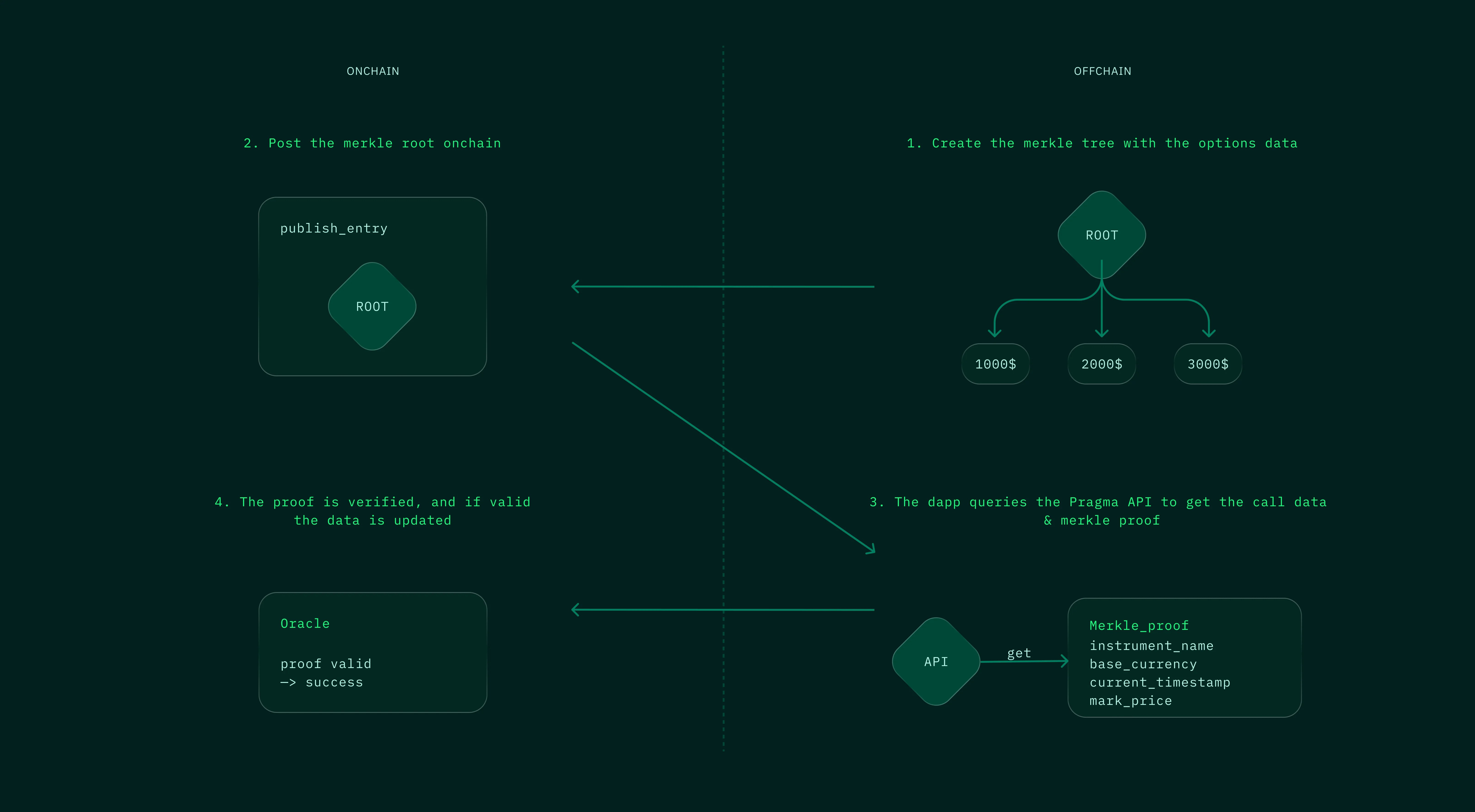 The merkle trees are built with data from [Deribit](https://www.deribit.com/), the leading platform for options trading.
Merkle root is published on-chain *every* block, ensuring data freshness.
Merkle proofs with associated data can be retrieved through REST and WebSocket endpoints or through a Rust crate we provide.
Data is updated on-demand on-chain upon successful verification of the merkle proof.
## Key Features
Easy-to-use Rust SDK for seamless integration
Supports both mainnet and testnet environments
Flexible block selection for data retrieval
Access to real-time option pricing data
## Usage
To start using the Pragma Consumer SDK in your Rust project:
### 1. Add the SDK to your Cargo.toml
```toml Cargo.toml theme={null}
[dependencies]
pragma-consumer = "0.1.0"
```
### 2. Initialize the Consumer in your code
```rust Initialize theme={null}
let api_config = ApiConfig {
base_url: PragmaBaseUrl::Prod,
api_key: "your_api_key".into(),
};
let consumer = PragmaConsumerBuilder::new()
.on_mainnet()
.with_http(api_config)
.await?;
```
### 3. Fetch Merkle Feed data
```rust Fetch Data theme={null}
let instrument = instrument!("BTC-16AUG24-52000-P");
let merkle_feed_calldata = consumer
.get_merkle_feed_calldata(&instrument, None)
.await?;
```
### 4. Use the result to update the data on-chain
If you are just trying to get started with our Options Data Feed, see this self-contained code snippet here. The full Oracle interface specification is available [here](https://github.com/Astraly-Labs/pragma-oracle/blob/main/src/compute_engines/summary_stats/summary_stats.cairo).
```rust main.rs theme={null}
let provider = JsonRpcClient::new(HttpTransport::new(
Url::parse("https://starknet-sepolia.public.blastapi.io/rpc/v0_7").unwrap(),
));
let signer = LocalWallet::from(SigningKey::from_secret_scalar(
Felt::from_hex("YOUR_PRIVATE_KEY_IN_HEX_HERE").unwrap(),
));
let address = Felt::from_hex("YOUR_ACCOUNT_CONTRACT_ADDRESS_IN_HEX_HERE").unwrap();
let summary_stats_address =
Felt::from_hex("0x0379afb83d2f8e38ab08252750233665a812a24278aacdde52475618edbf879c").unwrap();
let mut account = SingleOwnerAccount::new(
provider,
signer,
address,
chain_id::SEPOLIA,
ExecutionEncoding::New,
);
let result = account
.execute_v1(vec![Call {
to: summary_stats_address,
selector: get_selector_from_name("update_options_data").unwrap(),
calldata: merkle_feed_calldata.as_calldata(),
}])
.send()
.await
.unwrap();
println!("Transaction hash: {:#064x}", result.transaction_hash);
```
## Next steps
Check out our examples to see the SDK in action and learn more about integrating Pragma's Merkle Feeds into your project.
For more detailed technical information, please refer to our full documentation on GitHub.
View comprehensive API reference on docs.rs.
The merkle trees are built with data from [Deribit](https://www.deribit.com/), the leading platform for options trading.
Merkle root is published on-chain *every* block, ensuring data freshness.
Merkle proofs with associated data can be retrieved through REST and WebSocket endpoints or through a Rust crate we provide.
Data is updated on-demand on-chain upon successful verification of the merkle proof.
## Key Features
Easy-to-use Rust SDK for seamless integration
Supports both mainnet and testnet environments
Flexible block selection for data retrieval
Access to real-time option pricing data
## Usage
To start using the Pragma Consumer SDK in your Rust project:
### 1. Add the SDK to your Cargo.toml
```toml Cargo.toml theme={null}
[dependencies]
pragma-consumer = "0.1.0"
```
### 2. Initialize the Consumer in your code
```rust Initialize theme={null}
let api_config = ApiConfig {
base_url: PragmaBaseUrl::Prod,
api_key: "your_api_key".into(),
};
let consumer = PragmaConsumerBuilder::new()
.on_mainnet()
.with_http(api_config)
.await?;
```
### 3. Fetch Merkle Feed data
```rust Fetch Data theme={null}
let instrument = instrument!("BTC-16AUG24-52000-P");
let merkle_feed_calldata = consumer
.get_merkle_feed_calldata(&instrument, None)
.await?;
```
### 4. Use the result to update the data on-chain
If you are just trying to get started with our Options Data Feed, see this self-contained code snippet here. The full Oracle interface specification is available [here](https://github.com/Astraly-Labs/pragma-oracle/blob/main/src/compute_engines/summary_stats/summary_stats.cairo).
```rust main.rs theme={null}
let provider = JsonRpcClient::new(HttpTransport::new(
Url::parse("https://starknet-sepolia.public.blastapi.io/rpc/v0_7").unwrap(),
));
let signer = LocalWallet::from(SigningKey::from_secret_scalar(
Felt::from_hex("YOUR_PRIVATE_KEY_IN_HEX_HERE").unwrap(),
));
let address = Felt::from_hex("YOUR_ACCOUNT_CONTRACT_ADDRESS_IN_HEX_HERE").unwrap();
let summary_stats_address =
Felt::from_hex("0x0379afb83d2f8e38ab08252750233665a812a24278aacdde52475618edbf879c").unwrap();
let mut account = SingleOwnerAccount::new(
provider,
signer,
address,
chain_id::SEPOLIA,
ExecutionEncoding::New,
);
let result = account
.execute_v1(vec![Call {
to: summary_stats_address,
selector: get_selector_from_name("update_options_data").unwrap(),
calldata: merkle_feed_calldata.as_calldata(),
}])
.send()
.await
.unwrap();
println!("Transaction hash: {:#064x}", result.transaction_hash);
```
## Next steps
Check out our examples to see the SDK in action and learn more about integrating Pragma's Merkle Feeds into your project.
For more detailed technical information, please refer to our full documentation on GitHub.
View comprehensive API reference on docs.rs.