> ## Documentation Index
> Fetch the complete documentation index at: https://docs.pragma.build/llms.txt
> Use this file to discover all available pages before exploring further.
# Introduction
> Welcome to the Pragma Node API documentation
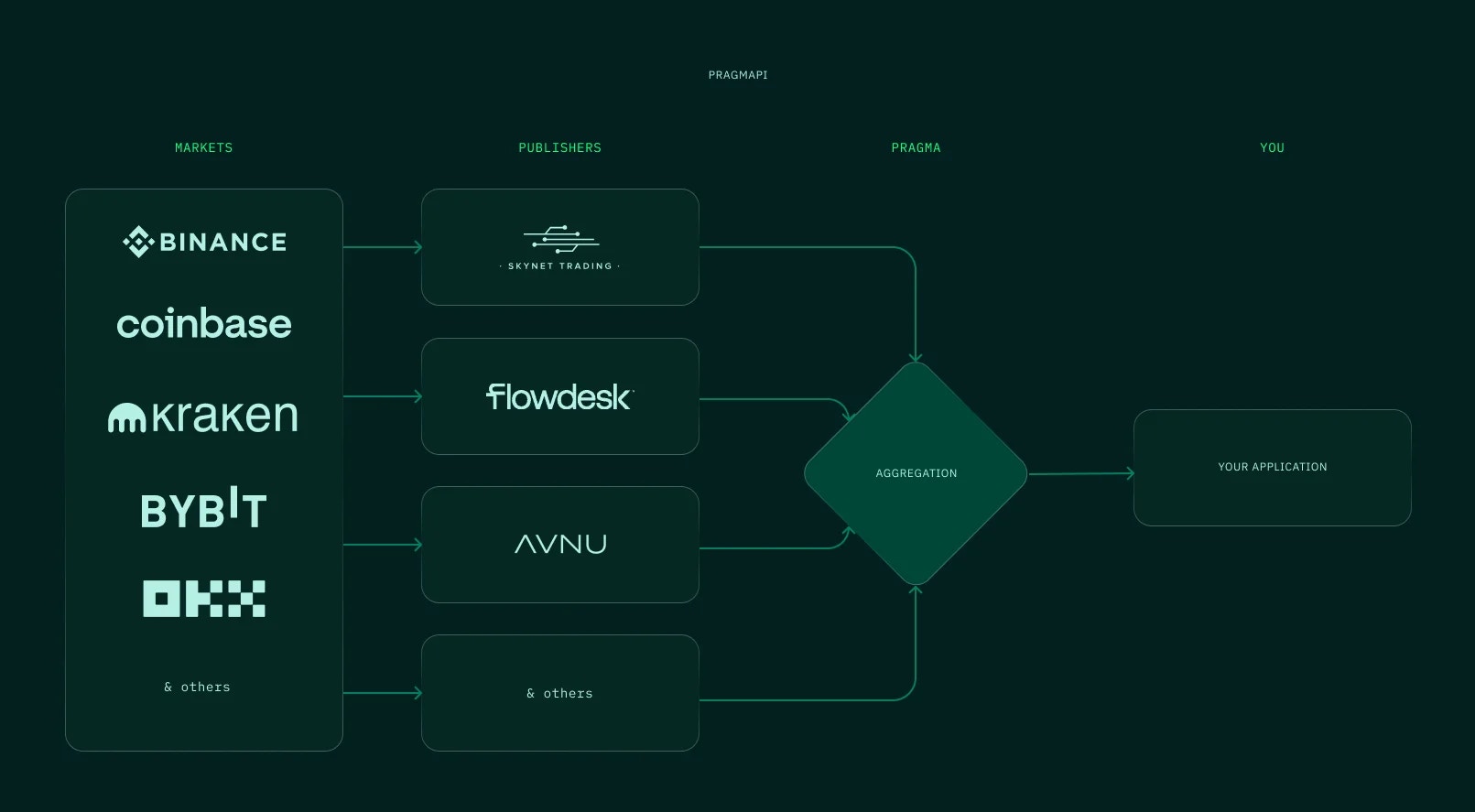 Pragma offers a highly accurate, readily available, and fast API built on our extensive network of data providers. This empowers developers to drive the evolution of next-generation applications. Our API provides the most reliable prices and financial data at the highest frequency possible.
## Key Features
Access to market data with millisecond latency, ensuring your applications always have the most current information for critical decision-making.
Our API is designed to be openly accessible, allowing anyone to build on our infrastructure without gatekeeping or excessive restrictions.
Thoroughly tested in high-stakes environments with proven performance during market volatility and network congestion.
Comprehensive set of endpoints covering all your data needs with consistent response formats and thorough documentation.
## Base URL
```bash theme={null}
https://api.devnet.pragma.build/node/v1
```
We recommend you use the **Development** endpoint until you are confident about going to production.
```bash theme={null}
https://api.production.pragma.build/node/v1
```
Only switch to the Production endpoint when your application is fully tested and ready for deployment.
## Authentication
Most endpoints require authentication using an API key. Include your API key in the request headers:
```bash theme={null}
X-API-KEY:
```
We are currently still in private beta, DM us on [twitter](https://x.com/pragmaoracle) or [telegram](https://t.me/bglabs) to get your own api key.
## API Groups
Our API is divided into the following categories:
Access to aggregated price data and real-time market information across multiple sources.
Get accurate market prices from multiple aggregated sources
Access comprehensive data for technical and fundamental analysis
Power your automated trading strategies with reliable data
Monitor market conditions to optimize your risk exposure
Interact with on-chain price feeds and historical data directly from blockchain sources.
Query verified historical price data points
Validate data integrity with cryptographic proofs
Direct integration with Pragma's oracle infrastructure
Helper functions for seamless blockchain application development
Real-time data streaming capabilities for instant updates without polling.
Receive price changes as they happen with minimal delay
Build responsive applications that react to market changes
Maintain open connections instead of frequent polling
Track connection status and health with built-in diagnostics
## Getting Started
Reach out to us on [Twitter](https://x.com/pragmaoracle) or [Telegram](https://t.me/bglabs) to request access to our private beta.
Start with our Development environment for testing your integration.
Use our example code snippets to make your first API call:
```javascript JavaScript theme={null}
const response = await fetch('https://api.devnet.pragma.build/node/v1/prices/latest?pair=BTC-USD', {
method: 'GET',
headers: {
'X-API-KEY': 'your-api-key-here'
}
});
const data = await response.json();
console.log(data);
```
```python Python theme={null}
import requests
headers = {
'X-API-KEY': 'your-api-key-here'
}
response = requests.get('https://api.devnet.pragma.build/node/v1/prices/latest?pair=BTC-USD', headers=headers)
data = response.json()
print(data)
```
```rust Rust theme={null}
use reqwest;
#[tokio::main]
async fn main() -> Result<(), Box> {
let client = reqwest::Client::new();
let resp = client.get("https://api.devnet.pragma.build/node/v1/prices/latest?pair=BTC-USD")
.header("X-API-KEY", "your-api-key-here")
.send()
.await?;
let data = resp.json::().await?;
println!("{:#?}", data);
Ok(())
}
```
Dive deeper into our comprehensive API documentation to discover all available endpoints and features.
## Rate Limits
During our beta phase, we apply flexible rate limits based on your use case. Contact our team for details about your specific allocation.
For production applications, we offer tiered plans with appropriate rate limits to meet your needs.
Pragma offers a highly accurate, readily available, and fast API built on our extensive network of data providers. This empowers developers to drive the evolution of next-generation applications. Our API provides the most reliable prices and financial data at the highest frequency possible.
## Key Features
Access to market data with millisecond latency, ensuring your applications always have the most current information for critical decision-making.
Our API is designed to be openly accessible, allowing anyone to build on our infrastructure without gatekeeping or excessive restrictions.
Thoroughly tested in high-stakes environments with proven performance during market volatility and network congestion.
Comprehensive set of endpoints covering all your data needs with consistent response formats and thorough documentation.
## Base URL
```bash theme={null}
https://api.devnet.pragma.build/node/v1
```
We recommend you use the **Development** endpoint until you are confident about going to production.
```bash theme={null}
https://api.production.pragma.build/node/v1
```
Only switch to the Production endpoint when your application is fully tested and ready for deployment.
## Authentication
Most endpoints require authentication using an API key. Include your API key in the request headers:
```bash theme={null}
X-API-KEY:
```
We are currently still in private beta, DM us on [twitter](https://x.com/pragmaoracle) or [telegram](https://t.me/bglabs) to get your own api key.
## API Groups
Our API is divided into the following categories:
Access to aggregated price data and real-time market information across multiple sources.
Get accurate market prices from multiple aggregated sources
Access comprehensive data for technical and fundamental analysis
Power your automated trading strategies with reliable data
Monitor market conditions to optimize your risk exposure
Interact with on-chain price feeds and historical data directly from blockchain sources.
Query verified historical price data points
Validate data integrity with cryptographic proofs
Direct integration with Pragma's oracle infrastructure
Helper functions for seamless blockchain application development
Real-time data streaming capabilities for instant updates without polling.
Receive price changes as they happen with minimal delay
Build responsive applications that react to market changes
Maintain open connections instead of frequent polling
Track connection status and health with built-in diagnostics
## Getting Started
Reach out to us on [Twitter](https://x.com/pragmaoracle) or [Telegram](https://t.me/bglabs) to request access to our private beta.
Start with our Development environment for testing your integration.
Use our example code snippets to make your first API call:
```javascript JavaScript theme={null}
const response = await fetch('https://api.devnet.pragma.build/node/v1/prices/latest?pair=BTC-USD', {
method: 'GET',
headers: {
'X-API-KEY': 'your-api-key-here'
}
});
const data = await response.json();
console.log(data);
```
```python Python theme={null}
import requests
headers = {
'X-API-KEY': 'your-api-key-here'
}
response = requests.get('https://api.devnet.pragma.build/node/v1/prices/latest?pair=BTC-USD', headers=headers)
data = response.json()
print(data)
```
```rust Rust theme={null}
use reqwest;
#[tokio::main]
async fn main() -> Result<(), Box> {
let client = reqwest::Client::new();
let resp = client.get("https://api.devnet.pragma.build/node/v1/prices/latest?pair=BTC-USD")
.header("X-API-KEY", "your-api-key-here")
.send()
.await?;
let data = resp.json::().await?;
println!("{:#?}", data);
Ok(())
}
```
Dive deeper into our comprehensive API documentation to discover all available endpoints and features.
## Rate Limits
During our beta phase, we apply flexible rate limits based on your use case. Contact our team for details about your specific allocation.
For production applications, we offer tiered plans with appropriate rate limits to meet your needs.